
I still remember the day I burned through $3,000 in Facebook ads without a single sale.
My hands were shaking as I stared at the Ads Manager dashboard. The numbers didn’t lie. My creative? Dead. My audience? Wrong. My entire approach? A complete disaster.
That moment changed everything for me. I realized I needed a system. Not just random testing. Not just throwing money at the wall. I needed a real Facebook ad testing framework that actually worked.
Three years later, I’ve tested over 500 ad variations. I’ve spent six figures on Facebook ads testing. And I’ve finally cracked the code on what works and what doesn’t.
Here’s everything I learned.
Why Most Facebook Ad Testing Fails (And How to Fix It)
Let’s get real for a second. Most people approach Facebook split testing like they’re gambling at a casino. They create an ad, boost it, and pray for results.
That’s not testing. That’s hoping.
The truth is, your most successful ads will die out quickly once you scale them. This happens to everyone. Even the big brands with massive budgets face this problem.
So what’s the solution?
You need three things:
- A clear hypothesis before you test
- Enough budget to get real data
- The discipline to kill losers fast
I learned this the hard way. My first 20 tests failed because I was testing everything at once. Different images, different copy, different audiences. All in one ad set.
That was my first massive mistake.
When everything changes at once, you learn nothing. You can’t tell which variable moved the needle.
Think about it like cooking. If you change the salt, the sugar, the butter, and the temperature all at once, how do you know which one ruined the cake?
Split testing involves creating multiple ad sets to find the top performer by testing one element at a time.
The Reality Check: How Much Money Do You Actually Need?
Here’s a question I get constantly: “How much should I spend on testing Facebook ads?”
The answer isn’t what you want to hear.
With a budget of $250 to $500, you can typically get a really good ad and complete all testing in a 7 to 10-day period. That’s for small businesses.
But here’s the catch. If you’re selling high-ticket items or running an e-commerce business, you might need more. Much more.
I once worked with a furniture company. Their average order value was $2,500. They needed at least $1,000 just to test one audience properly.
Why? Because experts allocate around $50 to $100 per ad set to get meaningful results.
Let me break down the math for you:
Small Business Testing Budget:
- $20-30 per day per ad set
- Test 3-5 variations
- Run for 7-10 days
- Total: $420-$1,500
Medium Business Testing Budget:
- $50-100 per day per ad set
- Test 5-10 variations
- Run for 7-14 days
- Total: $1,750-$14,000
Enterprise Testing Budget:
- $200+ per day per ad set
- Test 10-20 variations
- Run continuously
- Total: $14,000+ per month
The real kicker? An ad set needs 50 conversions per week to exit the learning phase and feed the algorithm properly.
Can you work with less? Sure. But your results won’t be reliable.
My 5-Step Facebook Ad Testing Framework (That Actually Works)
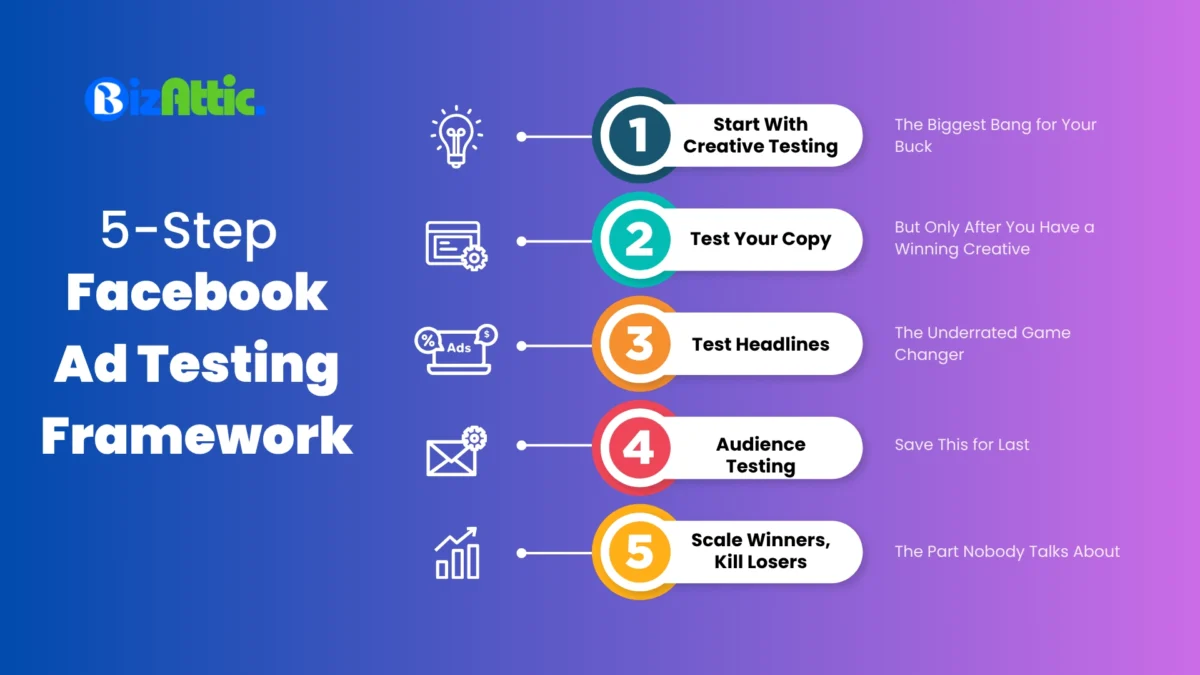
After burning through money and testing hundreds of variations, I developed this framework. It’s simple. It’s repeatable. And it works.
Step 1: Start With Creative Testing (The Biggest Bang for Your Buck)
Listen carefully. This is the most important part.
Creative testing has by far the highest impact on your results and should be prioritized for the largest wins.
Not audience testing. Not placement testing. Creative testing.
Why? Because your image or video is what stops the scroll. It’s what makes someone pause their mindless Facebook browsing and actually look at your ad.
I learned this after wasting two months testing audiences. My CTR barely moved. Then I changed one image. Boom. CTR jumped from 0.8% to 2.3%.
Same audience. Same copy. Different image.
Here’s my approach:
Week 1: Test 5 Different Visual Concepts
- 2 lifestyle images
- 1 product-only image
- 1 user-generated content style
- 1 meme or illustration
Keep everything else identical. Same copy, same headline, same audience.
Give each creative $30-50 per day. Run for 5-7 days.
What to watch:
- Click-through rate (CTR)
- Cost per click (CPC)
- Cost per result
Kill any ad that hasn’t gotten at least 100 clicks after spending $150. Don’t be emotional about it. Just kill it.
Step 2: Test Your Copy (But Only After You Have a Winning Creative)
Once you find your winning visual, now test the copy.
This is where most people mess up. They test copy and creative at the same time. Don’t do that.
When testing, all ad sets should be exactly the same except for the element you’re testing.
I test 3-5 copy variations:
- Short and punchy (2-3 sentences)
- Story-based (personal angle)
- Benefit-focused (what’s in it for them)
- Problem-agitation (call out their pain)
- Social proof-heavy (testimonials)
Each copy variation gets your winning image. Same audience, same budget.
Run for 5 days minimum.
Pro tip: I wish someone had told me earlier: Test emojis. Seriously. Adding emojis can improve ad performance, but they should resonate with your product and brand.
I added three emojis to my fitness ad copy. CTR increased by 0.4%. That might sound small, but it cut my cost per lead by $2.
If you use Shopify, you can checkout my Shopify SEO Checklist for organic growth.
Step 3: Test Headlines (The Underrated Game Changer)
Headlines are sneaky. They sit right below your image. Most people barely notice them.
But they matter. A lot.
Headlines move the needle for your ads, and testing 3 to 5 headlines can significantly improve performance.
I test headlines in two waves:
First Wave – Direct vs Curiosity:
- “Get Fit in 30 Days or Your Money Back”
- “The Workout Secret Nobody Talks About”
- “Join 10,000+ People Who Transformed Their Body”
Second Wave – Benefit Focused:
- “Burn Fat Without Giving Up Carbs”
- “Finally, A Workout That Fits Your Schedule”
- “Feel Stronger in Just 2 Weeks”
Test 3-5 at a time. Same image, same copy, different headlines only.
Step 4: Audience Testing (Save This for Last)
Most people start here. That’s backwards.
Why test audiences when you don’t even know if your creative works?
Target audiences have a significant impact on ad performance, as cost-per-click can vary by over 1000% depending on the audience.
But here’s what I do differently. I don’t start with detailed targeting anymore.
I use broad targeting first. Let Facebook’s algorithm find my people.
Then I create these test audiences:
- Website visitors (last 30 days)
- People who engaged with my content
- Custom audience from my email list
- Lookalike audience (1% of purchasers)
- Cold audience (broad targeting)
Each audience gets my winning ad (creative + copy + headline that already proved successful).
Budget: $50 per audience per day.
Run for 7 days minimum.
Step 5: Scale Winners, Kill Losers (The Part Nobody Talks About)
This is where discipline matters most.
If after 3 days an ad set isn’t performing, it’s time to shut it down.
I use these rules:
Kill an ad if:
- CPC is 2x higher than your goal after $100 spent
- CTR is below 0.5% after 500 impressions
- No conversions after spending 2x your target CPA
Scale an ad if:
- CPA is 20% below your target
- CTR is 2%+ consistently
- ROAS is above 3
When I scale, I don’t double budgets overnight. That’s another rookie mistake I made early on.
I increase by 20% every 3 days. Slow and steady. This keeps the algorithm stable.
The Testing Calendar: When to Test What
One of my biggest breakthroughs came when I stopped testing randomly. I created a schedule.
Here’s my testing calendar:
Week 1: Creative testing (5 variations)
Week 2: Analyze results, test copy (3-5 variations)
Week 3: Analyze results, test headlines (3-5 variations)
Week 4: Rest week – let winners run, gather data
Week 5: Audience testing (5 audiences)
Week 6: Scale winners from previous tests
Then repeat.
Testing new ads once per week using Dynamic Creative is the cornerstone of a successful strategy.
This rhythm keeps fresh ads flowing without overwhelming my budget.
Common Facebook Ad Testing Mistakes (That Cost Me Thousands)
Let me save you some money. Here are the mistakes that hurt the most.
Mistake #1: Testing Too Many Things at Once
I did this for three months straight. Created 20 different ads with different everything.
Result? No idea what worked.
Testing multiple changes at once prevents you from understanding which adjustment improved performance.
One variable per test. Always.
Mistake #2: Not Waiting Long Enough
I used to check my ads every hour. I made changes after 6 hours if I didn’t see results.
Horrible idea.
Facebook Ads go into a learning phase where the algorithm segments your audience and tests to find the best segment.
Give it at least 3-5 days. Better yet, wait a full week before making decisions.
Mistake #3: Budget Too Low
I tried running tests with $5 per day. Thought I was being smart and frugal.
I was just wasting time.
When the ad budget is too low, you don’t get enough data, and the sample size is too small to draw conclusions.
Minimum $20 per day per ad set. Preferably $30-50.
Mistake #4: Ignoring Mobile Users
A significant portion of Facebook users access the platform via mobile devices, and not optimizing for mobile can limit reach and effectiveness.
Always preview your ads on mobile. Most of your traffic will come from phones.
If your image text is too small, nobody can read it on mobile. If your video doesn’t work without sound, you’re losing 85% of viewers.
Mistake #5: Testing Without the Facebook Pixel
This one almost ended my Facebook ads testing career.
Not utilizing the Meta Pixel is one of the biggest beginner mistakes, as it tracks visitor behavior and ensures ads are shown to the right people.
Install it. Test it. Make sure it’s working before you spend a single dollar.
Without the Pixel, you’re flying blind. You can’t track conversions. You can’t build lookalike audiences. You can’t retarget.
It’s like trying to drive at night with no headlights.
Advanced Testing Strategies (For When You’re Ready)
Once you master the basics, these advanced tactics can take you further.
Dynamic Creative Testing
Dynamic Creative allows you to provide multiple images and ad copy, letting Facebook’s algorithm find the winning combination 100 times quicker than manual testing.
I use the 3:2:2 method:
- 3 different creatives
- 2 different primary texts
- 2 different headlines
Facebook mixes and matches these automatically. Finds winners in days instead of weeks.
The Creative Tester Campaign
The creative tester campaign is designed for continuously testing new ad creatives to combat creative fatigue.
I run this 24/7 with a dedicated budget. Never turn it off.
Budget: 20% of my total ad spend.
It constantly feeds new winners into my main campaigns.
Campaign Budget Optimization (CBO)
Facebook offers a tool that automatically distributes your budget to the best-performing ad sets.
Once enabled, Facebook analyzes each ad set’s performance to identify the best performers while reducing budget for underperformers.
I use CBO for scaling. Not for testing.
During testing, I want control. During scaling, I let Facebook optimize.
The Testing Tools You Actually Need
Forget fancy software. Here’s what I actually use:
Facebook Ads Manager – Obviously. This is where everything happens.
Facebook Pixel Helper (Chrome Extension) – Install and actually use the Pixel Helper extension to ensure tracking works properly.
Google Sheets – I track every test manually. Sounds old school, but it works.
Canva – For creating ad creatives fast.
That’s it. I spent $500 on fancy tools once. Cancelled them all after two months.
You don’t need expensive software to test Facebook ads effectively.
My Testing Framework in Action (Real Example)
Let me show you exactly how this worked for a client selling meal prep containers.
Starting Point:
- Budget: $500 for testing
- Goal: Find profitable ad under $8 CPA
- Timeline: 2 weeks
Week 1 – Creative Testing:
Tested 5 different images:
- Containers with food inside (lifestyle)
- Containers stacked (product focus)
- Someone packing lunch (action shot)
- Before/after fridge organization
- Meme about meal prep struggles
Budget: $30/day per creative = $150 per creative for 5 days
Results:
- Lifestyle image: CTR 1.8%, CPC $0.95
- Product focus: CTR 0.9%, CPC $1.85
- Action shot: CTR 2.3%, CPC $0.72 ← Winner
- Before/after: CTR 1.2%, CPC $1.40
- Meme: CTR 3.1%, CPC $0.58 ← Surprise winner
Killed the bottom 3. Kept the action shot and meme.
Week 2 – Copy Testing:
Used the winning creatives with 3 different copy angles:
- Health benefits focused
- Time-saving focused
- Money-saving focused
Budget: $40/day per variation = $120 per variation for 3 days
Results:
- Health angle: CPA $12
- Time-saving: CPA $7.50 ← Winner
- Money-saving: CPA $9
Final Winner:
- Meme creative + Time-saving copy
- CPA: $6.80
- Beat the goal by 15%
Total testing investment: $750 (slightly over budget but worth it)
This ad ran profitably for 4 months before creative fatigue hit.
How to Know When Your Test is Actually Done
This confused me forever. When do I stop a test?
I use three signals:
Signal #1: Statistical Significance
Aim to collect at least 500 conversions before making conclusions, or even more if testing multiple variations.
If you can’t get 500 conversions, at least get 100 clicks per variation.
Signal #2: Stable Metrics
Watch your CPA for over 3-5 days. If it bounces wildly (one day $5, next day $15), keep testing.
If it stays in a tight range ($7-9), you have enough data.
Signal #3: Clear Winner Emerges
When one ad consistently performs 20%+ better than others, you found your winner.
Don’t keep testing forever hoping for perfection. Good enough is good enough.
What to Do When Everything Fails (It Happens to Everyone)
Sometimes, tests just bomb. Every variation sucks.
I’ve been there. Multiple times.
Here’s my failure protocol:
Step 1: Take a Break
Stop testing for 48 hours. Step away from Ads Manager.
Sometimes you’re too close to see the real problem.
Step 2: Go Back to Basics
Maybe your offer is the problem, not your ads. Maybe your product market fit is off.
I once spent $2,000 testing a product nobody wanted. No amount of ad testing could fix that.
Step 3: Study Your Competitors
Study top brands in your industry by looking at their ads, funnels, offers, and seasonal promotions to adapt successful strategies.
Use Facebook Ad Library. See what’s working for others.
Don’t copy. Get inspired.
Step 4: Test Something Radically Different
If subtle tweaks aren’t working, try something completely different.
I was testing professional photos for a fitness brand. All failed. Then I tested a raw, un-edited selfie from my phone.
That raw selfie outperformed every professional photo by 3x.
Sometimes ugly works.
The Facebook Split Test Tool (And Why I Don’t Always Use It)
Facebook has a built-in A/B testing tool. It’s in Ads Manager under “Experiments.”
A/B testing lets you compare two versions by changing variables and ensuring audiences are evenly split with no overlap.
Sounds perfect, right?
Here’s the problem I found: Facebook’s experimentation tool sometimes picks winners too quickly without reaching minimum sample sizes or statistical significance.
So I use it selectively.
When I use Facebook’s A/B tool:
- Testing audiences (prevents overlap)
- Testing campaign objectives
- Testing with large budgets ($500+)
When I don’t use it:
- Quick creative tests
- Low-budget testing
- When I need more control
For most small business testing, I just create separate ad sets manually. More control, more flexibility.
Scaling Your Winners Without Killing Them
You found a winner. Great!
Now don’t screw it up by scaling too fast.
Increasing budgets too quickly can harm performance because it makes the algorithm work harder by constantly adjusting parameters.
My scaling rules:
The 20% Rule: Increase budget by 20% every 3 days maximum.
The Duplicate Strategy: Instead of raising the budget, duplicate the winning ad set. Keep the original running at the same budget.
The Vertical Scaling Approach: Test the same winning ad with new audiences. This scales reach without raising budgets.
I killed three profitable campaigns by doubling budgets overnight. Learn from my pain.
Building Your Testing System for Long-Term Success
Here’s the truth nobody wants to hear: You need to have a proactive approach to testing because markets change, people’s tastes change, and ads die out.
Testing isn’t something you do once. It’s something you do forever.
I dedicate 20-30% of my ad budget to testing. Always.
Even when campaigns are crushing it. Especially when they’re crushing it.
Because I know from experience that today’s winner is next month’s loser.
Serious advertisers test and replace creatives every 2 to 3 weeks to combat creative fatigue.
Build testing into your routine. Make it automatic. Make it boring.
That’s when it works best.
Facebook Ad Testing Framework – Quick Reference Table
Here’s everything in one place:
| Testing Element | Number to Test | Budget Per Variation | Duration | Kill If… | Scale If… |
| Creative | 3-5 images/videos | $30-50/day | 5-7 days | CTR < 0.5% after $100 | CTR > 2% consistently |
| Copy | 3-5 variations | $30-50/day | 5-7 days | CPC 2x target after $100 | CPA 20% below target |
| Headlines | 3-5 variations | $30-50/day | 5-7 days | No engagement after $75 | CTR improves 15%+ |
| Audiences | 3-5 audiences | $50-100/day | 7-10 days | No conversions after 2x CPA spend | ROAS > 3 |
| Placements | Auto vs Manual | $40-60/day | 7 days | CPM is 50% higher than auto | CPA is 25% lower |
Your Action Plan: Start Testing Today
Stop reading. Start doing.
Here’s your exact first week:
Day 1-2:
- Install Facebook Pixel (verify it works)
- Create 3 different image variations
- Write 1 ad copy (keep it simple)
- Set up 3 ad sets, $30/day each
Day 3-5:
- Monitor daily (but don’t touch anything)
- Track CTR, CPC, and early conversion signals
- Take notes on what you observe
Day 6-7:
- Analyze results
- Kill the worst performer
- Increase the budget by 20% for the best performer
- Plan next test (copy variations)
That’s it. Simple, actionable, doable.
Conclusion: Testing is How You Win
I started this article with a story about losing $3,000.
Here’s the ending: That failure taught me everything.
It forced me to build a Facebook ad testing framework that actually works. Not theory. Not guesses. Real, repeatable results.
The framework I shared isn’t complicated. It doesn’t require fancy tools or huge budgets.
It just requires discipline. Patience. And the willingness to kill ads that don’t work.
Creative testing tells you what you need to change to get more return from your ad campaigns.
Test your creatives first. Then copy. Then headlines. Then audiences. In that order.
Give each test enough budget and time. Kill losers fast. Scale winners slowly.
Do that consistently, and you’ll never waste another $3,000 like I did.
Start with $250. Test for one week. Find one winner.
That’s all you need to begin.
Frequently Asked Questions
How much should I spend to test Facebook ads effectively?
Start with $250-500 for basic testing if you’re a small business. Allocate $30-50 per day per ad set. Test 3-5 variations over 7-10 days. Larger businesses should budget $1,000-5,000 for comprehensive testing across multiple variables and audiences.
How long should I run a Facebook ad test?
Run tests for a minimum of 5-7 days to gather meaningful data. Facebook’s algorithm needs time to exit the learning phase. If testing audiences or expensive products, extend to 10-14 days to reach statistical significance with enough conversions.
What should I test first in Facebook ads?
Always test creative elements (images or videos) first. Creative has the highest impact on performance. Once you find a winning visual, then test copy variations. After that, test headlines, and finally test different audiences. Never test multiple elements simultaneously.
How do I know when to kill a Facebook ad during testing?
Kill an ad if the CPC is 2x higher than your goal after $100 spend, CTR stays below 0.5% after 500 impressions, or there are no conversions after spending 2x your target CPA. Give it at least 3 days before making this decision.
Can I test Facebook ads with a small budget under $100?
Yes, but results will be limited. With $100, you can run one test with 2-3 variations at $10-15 per day for 3-4 days. Focus on testing just one element (creative only) and use this as initial market validation before committing to larger budgets.
What’s the difference between Facebook split testing and A/B testing?
These terms are interchangeable. Both refer to testing two or more variations of an ad element to determine which performs better. Facebook’s official split test tool (found in Experiments) ensures audiences don’t overlap, while manual A/B testing uses separate ad sets in Ads Manager.
How many ad variations should I test at once?
Test 3-5 variations at a time. Testing fewer than 3 doesn’t give enough data points. Testing more than 5 spreads your budget too thin and takes longer to reach statistical significance. This sweet spot provides reliable results without excessive spend.
Should I use Facebook’s Dynamic Creative for testing?
Dynamic Creative works well for finding winning combinations quickly once you have proven creative assets. It’s ideal for testing different arrangements of your best images, copy, and headlines. However, for initial discovery of what works, manual testing gives you more control and clearer insights.
What metrics should I focus on during Facebook ad testing?
Focus on CTR (click-through rate) first to gauge ad engagement, CPC (cost per click) for efficiency, and CPA (cost per acquisition) or ROAS (return on ad spend) as your ultimate success metrics. CTR above 2%, CPC below your target, and ROAS above 3 indicate strong performance.
When should I scale a winning Facebook ad?
Scale when an ad consistently achieves CPA 20% below your target, maintains CTR above 2%, and delivers ROAS above 3 for at least 5-7 days. Increase the budget by only 20% every 3 days to avoid disrupting Facebook’s algorithm and maintain stable performance.